Change Voice in Video Keep Background Music
Separate dialogue from background audio, replace the voice in the same language, and mix the original music and sound effects back in.
- Same language, never translated
- Picture untouched
- Music and sound effects kept
Replacing Spoken Audio Usually Destroys Background Sound
- 1
Full-Track Replacement Wipes Music
Standard editors overwrite the entire master audio track to add a voiceover. Ambient noise, cinematic scores, and sound effects vanish unless you manually rebuild the soundbed.
- 2
Regenerating Video Changes the Visuals
With native-audio AI video generators, changing a voice means regenerating the whole clip. This consumes extra generation credits and produces entirely different picture frames.
- 3
Manual Stem Splitting Takes Hours
Manually isolating spoken frequencies, finding substitute tracks, and aligning voice timing sentence by sentence requires multiple audio editing tools and complex timeline work.
Stem Separation vs Full Audio Replacement
| Full-Track Replacement | DubSI Voice Swap Stem Separation | |
|---|---|---|
| Background Music | Muted or completely erased by new voiceover | Kept intact; new voice mixes over original track |
| Sound Effects & Ambience | Lost unless rebuilt from scratch | Preserved exactly as in the original recording |
| Video Frames | Often regenerated, altering visual footage | Picture is never edited; original video remains |
| Laughter and Sighs | Cut out, silenced, or left in the old voice | Re-performed naturally in the selected new voice |
| Singing Portions | Replaced with speech or overwritten | Detected automatically and kept in original form |
Based on DubSI Voice Swap audio stem separation pipeline vs full-track audio overwriting at the time of writing.
How to Swap Dialogue and Keep Background Tracks
- 1
Upload Video or Audio
Drop your MP4, MOV, WEBM, or MKV file. Plan limits apply, with up to 2 minutes per video on the free trial.
- 2
Choose Voices for Detected Speakers
Select a library voice, design one by age and pitch, or clone from a 4–30s consented sample. Assign up to 4 speakers or use Auto mode.
- 3
Review Stems and Download
Review line by line in the studio. Compare new and original audio, verify flagged words, and export video, WAV audio, or SRT subtitles.
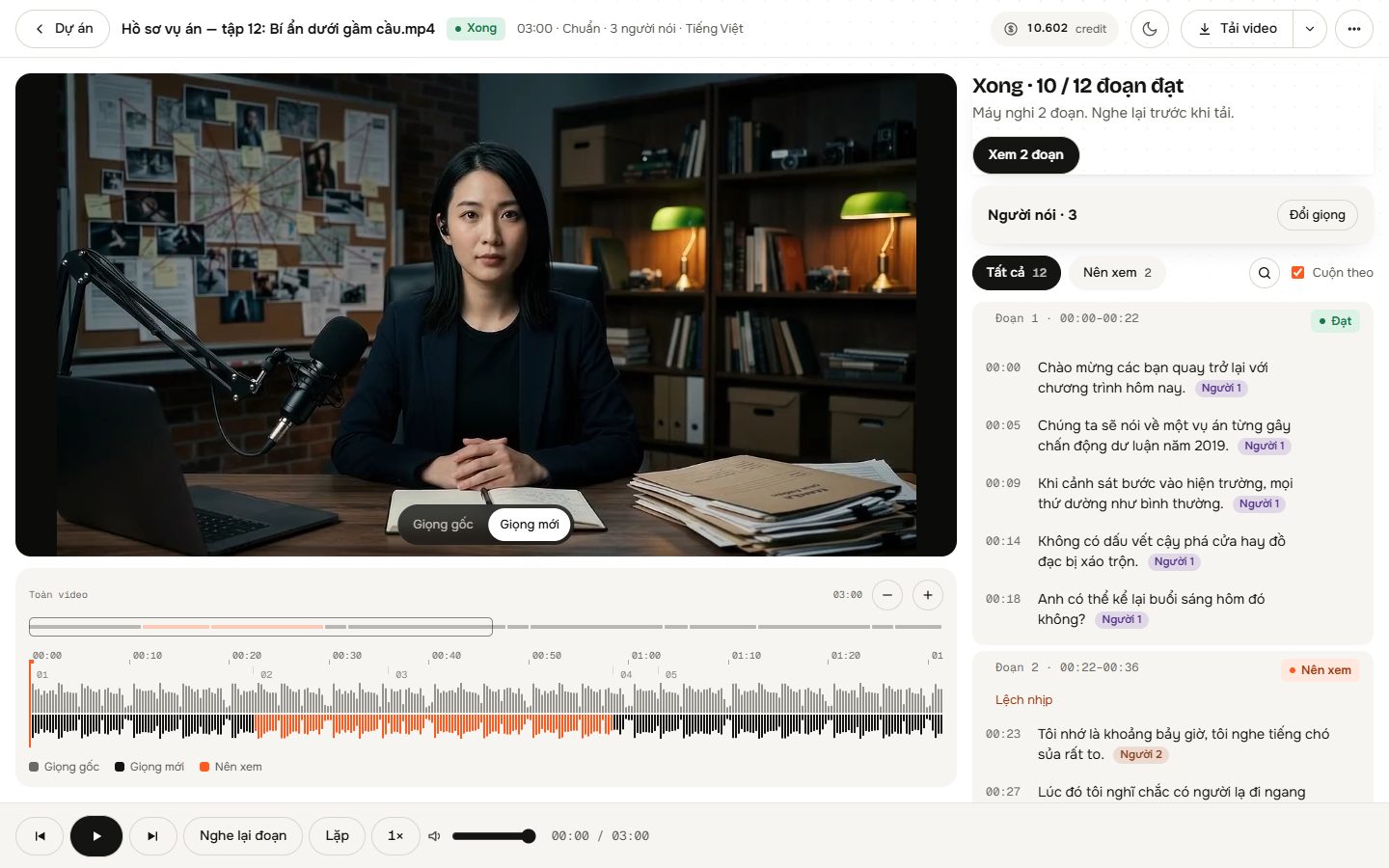
Precision Stem Separation and Voice Control
Intelligent Stem Splitting
AI separates the voice stem from the background music and sound effects, swapping only the vocal layer before mixing the master track back together.
Sentence-Level Lip Timing
The replacement voice matches the exact timing of the original speech sentence by sentence, keeping existing mouth movements in sync without touching the video.
Multi-Speaker Separation
Identifies who speaks each sentence using audio and video frames. Assign distinct voices to up to 4 individual speakers or let Auto mode match gender and age.
Non-Speech Vocal Continuity
Laughter and sighs are re-performed in the new voice instead of being cut, while singing segments are detected and preserved in their original form.
Per-Segment Studio Review
Switch between original and new audio instantly on any sentence, keep original audio for specific segments, or regenerate lines for just one speaker.
Automated Quality Inspection
The system listens back to every processed segment and highlights potential mispronunciations so you can review them prior to export.
When to Swap Voices While Preserving Background Sound
AI Video Generation Fixes
Keep the rich ambient audio and background music generated by tools like Kling 3.0 or Seedance 2.5 while swapping an unnatural or inconsistent voice.
Brand Cast Adjustments
Change the voice persona, gender, or age of an on-screen speaker for a commercial or tutorial without losing purchased background music or room sound.
Fixing Stitched Scene Voices
Unify character voices across multiple stitched AI video generations while keeping the distinct background audio and Foley effects of each scene.
Simple Pay-As-You-Go Pricing
Pay only for what you process with credits at $0.06 per minute on the Standard tier. New accounts receive 1,500 free credits to test without a subscription.
- 300 credits per minute of video at Standard tier
- Fast tier costs less; Pro tier costs more
- Automatic credit refund if processing fails due to a system error
- No monthly subscription required
Frequently asked questions
Does this tool translate speech to another language?
No. The tool does not perform cross-language translation. It replaces the voice in the same language with another selected voice, keeping the original spoken words.
Does the uploaded video need speech already?
Yes. The video must already contain spoken words from a recording, AI video generator, or lip-sync tool. It cannot generate speech from silence or text alone.
How does it keep background music intact?
AI separates the vocal track from the audio mix into independent stems. Only the voice stem is replaced, and the new speech is mixed back over the original music and effects.
Does the tool edit or regenerate video frames?
No. The visual track is never modified. The new voice follows original sentence timing so that existing on-screen mouth movements remain aligned with the audio.
Can I replace voices for multiple speakers in one clip?
Yes. The AI analyzes audio and video frames to detect speakers. You can assign up to 4 different voices manually or allow Auto mode to assign fitting voices by gender and age.
What happens if a character laughs or sings?
Laughter and sighs are re-performed using the chosen new voice rather than stripped out. Singing is automatically detected and retained in the original voice.
Replace Voices Without Losing Your Music
Upload your video, isolate dialogue stems, and keep every background sound effect and soundtrack note intact.
Get Started Free