Free AI Video Voice Changer
Swap voices in your video in the same language without re-rendering the visual. Test it online with 1,500 free credits.
- Same language, never translated
- Picture untouched
- Music and sound effects kept
Fix Dialogue Without Re-rendering Entire Video Clips
- 1
Regenerating Video Changes the Visuals
Changing a voice in native-audio AI video generators usually requires re-generating the entire shot. That consumes extra credits and alters your picture.
- 2
Inconsistent Voices Across Stitched Shots
Characters created across separate generations rarely keep the same vocal tone. Stitched video scenes often end up with mismatched voices.
- 3
Losing Background Music and Ambience
Standard audio replacements can wipe out your original audio bed. You are left rebuilding ambient sound and music tracks from scratch.
Free Credits vs Paid Pay-As-You-Go
| Free Trial | Paid Packs | |
|---|---|---|
| Starting Credits | 1,500 free credits on signup | Purchase as needed at $0.06 per min |
| Max Video Length | Up to 2 minutes per video | Standard plan video limits apply |
| Subscription Required | No subscription required | No subscription required |
| Background Preservation | Music and sound effects kept intact | Music and sound effects kept intact |
| Voice Options | Voice library, voice clone, design custom voice | Voice library, voice clone, design custom voice |
Based on standard features at the time of writing. Standard tier uses 300 credits per minute of video.
How to Swap Voices for Free in 3 Steps
- 1
Upload your video or audio
Add your MP4, MOV, WEBM, or MKV file containing spoken dialogue. The trial supports up to 2 minutes per video.
- 2
Choose your voices
Pick a voice from the library, clone your own with a 4–30 second consent sample, or design one. Assign voices per speaker.
- 3
Review, adjust, and download
Listen to segments in Studio, review flagged words, toggle original audio if needed, and export your video, WAV, or SRT.
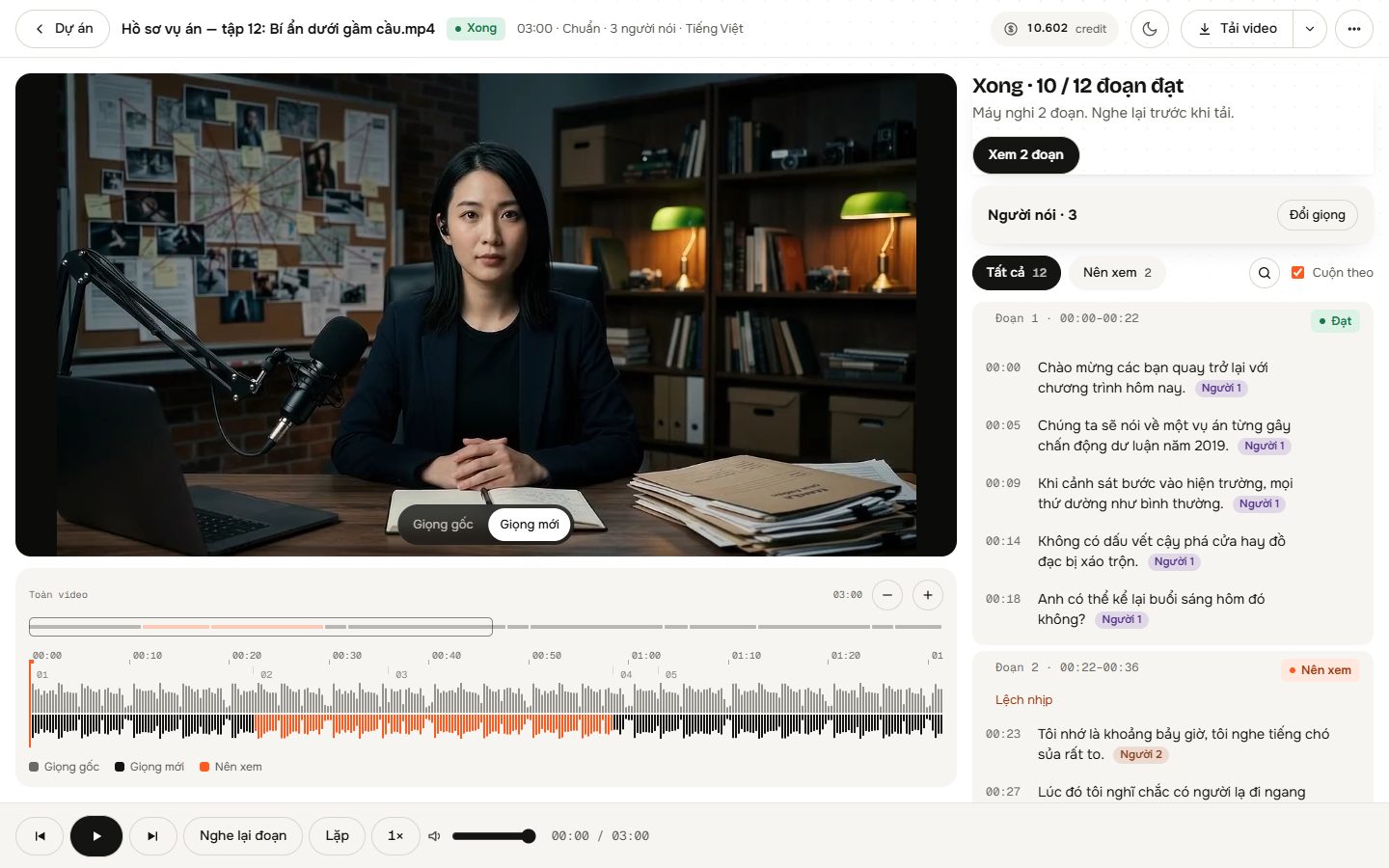
Precise Speech Re-voicing for Spoken Video
Original Timing Preserved
The new voice matches the timing of the original spoken words sentence by sentence, keeping existing mouth movements in sync.
Background Audio Separation
AI isolates the dialogue from background music and sound effects, then blends the new voice back over the original audio track.
Multi-Speaker Detection
The system detects different speakers by audio and video frames, letting you assign up to 4 distinct voices in one video.
Emotional Nuance Handling
Laughter and sighs are re-performed in the selected voice. Singing is automatically detected and kept original.
Studio Quality Check
AI listens back to processed lines to flag errors. You can toggle back to the original speech on any individual segment.
Where to Use Voice Swapping
AI Video Character Alignment
Unify character voices across multiple scenes generated with tools like Kling, Runway, or Veo without changing the visual frames.
Dialogue Voice Replacement
Re-voice existing dialogue with a different tone or gender in the same language without booking a studio re-recording.
Creator Audio Polishing
Replace harsh or unwanted vocal performances on your clips while retaining the underlying background music and sound effects.
Simple Pay-As-You-Go Credits
Start with 1,500 free credits on signup. Pay as you go at $0.06 per minute on the Standard tier with no recurring subscription required.
- New accounts receive 1,500 free trial credits
- Standard processing tier costs $0.06 per minute
- 300 credits per minute of video at Standard tier
- Failed processing due to system error is automatically refunded
Frequently asked questions
Does it translate to another language?
No. The tool does not translate speech into other languages. It re-voices dialogue strictly within the same language, keeping the original words and timing intact.
Does the video need speech already?
Yes. The tool does not generate dialogue for silent videos. Your uploaded file must already contain spoken words from dialogue, lip-sync tools, or reference audio.
What can I do with the free credits?
New accounts get 1,500 free credits to process video clips up to 2 minutes long. Standard tier uses 300 credits per minute of video.
Will changing the voice alter my video visuals?
No. The video picture is never edited or re-rendered. Only the vocal track is swapped, matching the timing so existing lip movements remain aligned.
What happens to background music and sound effects?
AI isolates the spoken voice from the background track, applies the new voice, and mixes it back over the original music and ambient sound.
Can I replace voices for multiple speakers?
Yes. The system identifies distinct speakers using audio and video frames. You can assign up to 4 separate voices or let Auto mode match voices by gender and time.
Swap Your First Video Voice Online
Upload your clip and use your 1,500 free credits. Keep your background music, original words, and visual frames intact.
Get Started Free