Kling AI Voice Swap Without Regenerating Video
Swap dialogue in Kling 3.0 and Kling 4.0 clips with cloned or custom voices. Keep the original lip-sync timing, background music, and sound effects intact.
- Same language, never translated
- Picture untouched
- Music and sound effects kept
Why Kling Dialogue Often Needs Voice Swapping
- 1
Rerolling Changes the Visuals
Changing dialogue in Kling usually requires a brand-new generation. That consumes video credits and alters the visual performance, acting, and framing of your scene.
- 2
Limited Native Dialogue Options
At the time of writing, Kling 3.0 lists 5 dialogue languages (Chinese, English, Japanese, Korean, Spanish). Getting your specific branded or cloned voice requires separate audio control.
- 3
Inconsistent Tone Across Cuts
Splicing multiple Kling 3.0 or 4.0 generations together often leads to audible voice drift between takes, breaking character continuity across a complete project.
Kling Native Dialogue vs. Kling + DubSI Voice Swap
| Kling Native Audio Alone | Kling Video + DubSI Voice Swap | |
|---|---|---|
| Voice Selection | Generic voice presets or character binding within Kling limits | Any voice from the library, custom attribute design, or cloned voice |
| Video Preservation | Regenerating audio alters visuals, expressions, and framing | Video frames never change; mouth timing stays matched sentence by sentence |
| Background Audio | Tied to video generation; regenerating rerolls soundscapes | AI separates spoken speech and mixes the new voice back over existing audio |
| Speaker Assignment | Handled during initial prompt and video generation | Auto mode or assign up to 4 distinct voices manually across detected speakers |
| Language Model | Kling 3.0 lists 5 dialogue languages at the time of writing | Re-voices speech in the same language without cross-language translation |
Based on public Kling 3.0 and Kling 4.0 specifications at the time of writing. DubSI Voice Swap changes speech audio only; it does not translate languages or alter video frames.
How to Swap Dialogue Voices in Kling Videos
- 1
Upload Your Kling Video
Export your clip from Kling 3.0 or Kling 4.0 and upload the MP4, MOV, WEBM, or MKV file (up to 2 minutes on free trials).
- 2
Choose Voices for Each Speaker
Select library presets, input attributes, or provide a 4–30 second clone sample with consent. Assign voices automatically or manually for up to 4 speakers.
- 3
Review Segments and Download
Check converted lines in Studio, toggle against the original audio, review automated quality flags, and export your video, WAV audio, or SRT subtitles.
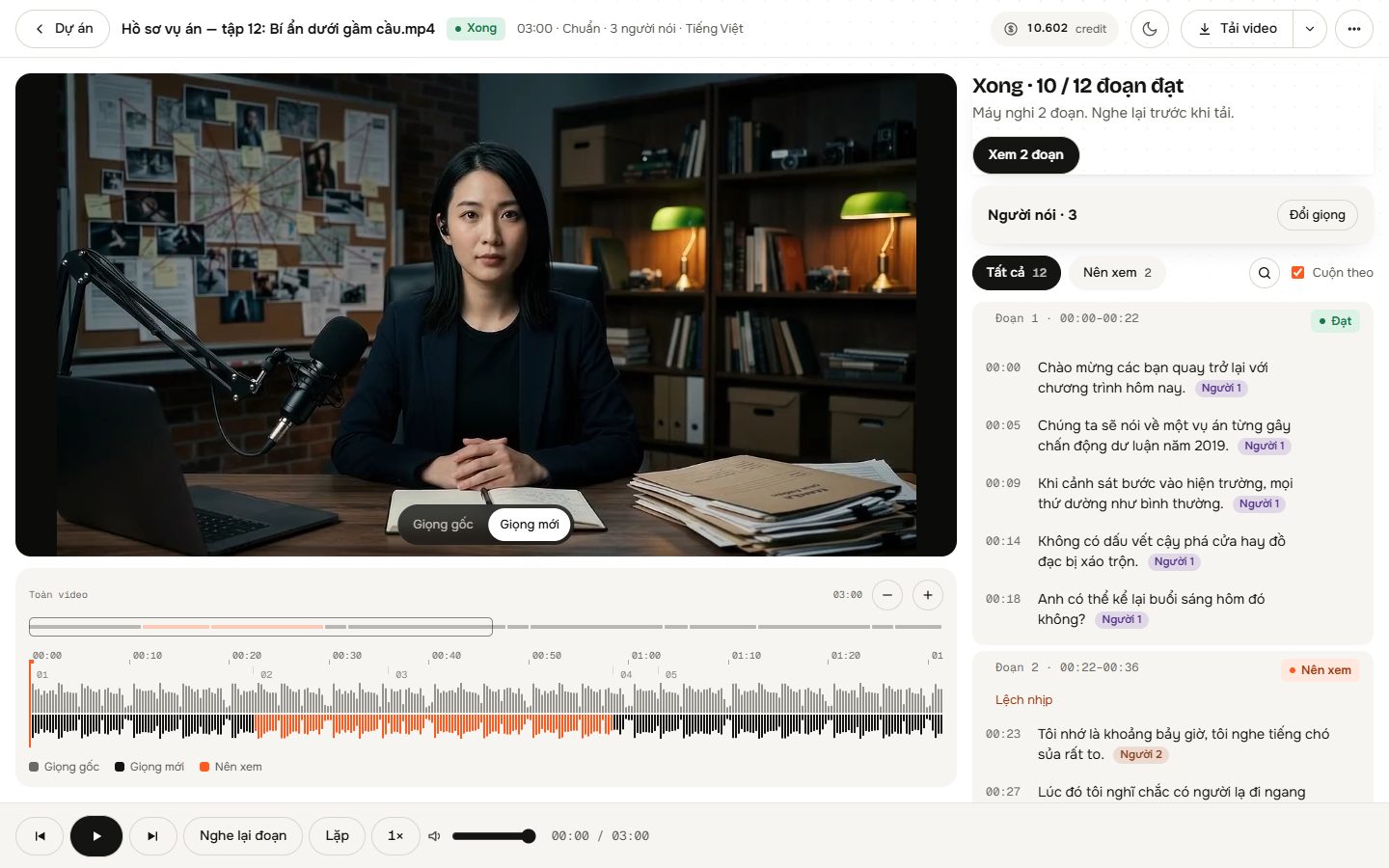
Audio Control for Kling Generations
Background Audio Separation
AI isolates speech from background music, room tone, and sound effects, placing the replacement voice over the preserved backdrop.
Sentence Timing Match
The replacement voice matches the exact timing and pacing of the original spoken sentences, maintaining alignment with Kling's mouth movements.
Voice Cloning with Consent
Upload or record a 4–30 second voice sample with proper speaker consent to give your Kling character your exact tone and pitch.
Multi-Speaker Detection
AI analyzes audio and visuals to separate lines across multiple characters. Use Auto mode or manually assign up to 4 custom voices.
Performance Nuance Retention
Laughter and sighs are re-performed in the selected voice profile, while detected singing remains in its original audio state.
Studio Quality Check
Inspect every line in the Studio editor, see flags for potential mispronunciations, and keep original audio for any segment if needed.
Where Kling Voice Swapping Fits Your Workflow
Branded Character Consistency
Maintain one uniform voice across dozens of Kling 3.0 or 4.0 clips without dealing with tonal drift between prompt generations.
Creator Voice Cloning
Generate video scenes in Kling and apply your own cloned voice to the dialogue so the character sounds unmistakably like you.
Fixing Imperfect Lines
Fix an awkward delivery or flat native AI voice in an otherwise flawless Kling video render without wasting credits on video re-rolls.
Pay-As-You-Go Video Audio Swapping
No subscription required. Pay only for the audio you process at $0.06 per minute on the Standard tier. Standard, Fast, and Pro options available.
- New signups receive 1,500 free credits to test
- 300 credits per minute of video at Standard tier
- Automatic credit refunds if processing encounters a system failure
- No monthly subscription lock-in; buy credits as needed
Frequently asked questions
Does this tool translate Kling dialogue to another language?
No. The tool does not translate speech into other languages. It re-voices dialogue strictly in the same language it was spoken, keeping the exact same words and sentence timing.
Does my Kling video need spoken speech already present?
Yes. The tool does not generate speech from silent video. Your Kling clip must already have audible spoken dialogue from Kling's audio generator, a guide track, or a lip-sync tool.
Will changing the voice alter the Kling video frames?
No. The video frames are never modified. The new voice follows the sentence timing of the original audio so that existing mouth movements remain matched.
Can I give different voices to multiple characters in a Kling scene?
Yes. In Multiple Speakers mode, you can assign up to 4 distinct voices. The system inspects audio and video frames to assign each line, or you can assign them manually before generating.
What happens to background music and Foley in the Kling clip?
AI separates the dialogue track from ambient sound effects, music, and background audio. Once the speech is replaced, the original background elements are mixed back into the final track.
Can I review and edit the re-voiced segments before exporting?
Yes. The Studio interface lets you listen to each line, toggle between the original and new voice, inspect quality check flags, or revert any segment back to its original audio.
Upgrade Your Kling Video Dialogue Today
Swap native Kling 3.0 and 4.0 dialogue for custom or cloned voices while keeping mouth timing and background audio intact.
Start Free Swap