Runway Gen Video Dubbing Without Regenerating
Keep your Runway Gen-4.5 generation, timing, and sound effects intact. Swap the voice in the same language using custom or library voices in one pass.
- Same language, never translated
- Picture untouched
- Music and sound effects kept
Fixing Runway Dialogue Shouldn't Waste Your Video Credits
- 1
Regenerating changes the visuals
At the time of writing, tweaking dialogue or tone in Runway Gen-4.5 requires regenerating the shot, which alters character motions, lighting, and camera movement.
- 2
Inconsistent voices across cuts
Stitching multiple Runway clips often results in shifting vocal tones between takes. Matching character voices across an entire sequence manually is difficult.
- 3
Lost background effects
Replacing a voice traditionally means manually stripping the audio and rebuilding sound effects, room tone, and ambient noise from scratch.
Redoing Lip Sync vs. One DubSI Voice Swap Pass
| Rerunning Runway Lip Sync | Re-Voicing with DubSI Voice Swap | |
|---|---|---|
| Visual Stability | Regenerating risks altering the visuals, framing, and character performance entirely. | The video picture is untouched; existing lip sync and mouth timing are preserved. |
| Audio Separation | Requires manual audio splitting to protect ambient audio and sound effects. | AI separates voice from background and mixes new speech over existing effects. |
| Character Consistency | Hard to guarantee the exact same vocal tone across separate generations. | Assign the exact same library or cloned voice across every finished clip. |
| Credit Cost | Consumes full video generation credits each time you adjust vocal delivery. | Pay-as-you-go voice conversion starting at $0.06 per minute. |
Based on public Runway Gen-4.5 workflows at the time of writing. DubSI Voice Swap re-voices spoken audio in the same language and does not modify video pixels.
How to Re-Voice Runway Videos in 3 Steps
- 1
Upload your Runway clip
Upload your Runway Gen-4.5 video (MP4, MOV, WEBM, or MKV) containing spoken dialogue, up to 2 minutes on trial.
- 2
Choose your voices
Select a voice from the library, create one from attributes, or clone a custom voice using a 4–30 second consent-backed sample.
- 3
Review and download
Listen to converted segments in Studio, keep originals if needed, and export your video, WAV audio, or SRT subtitles.
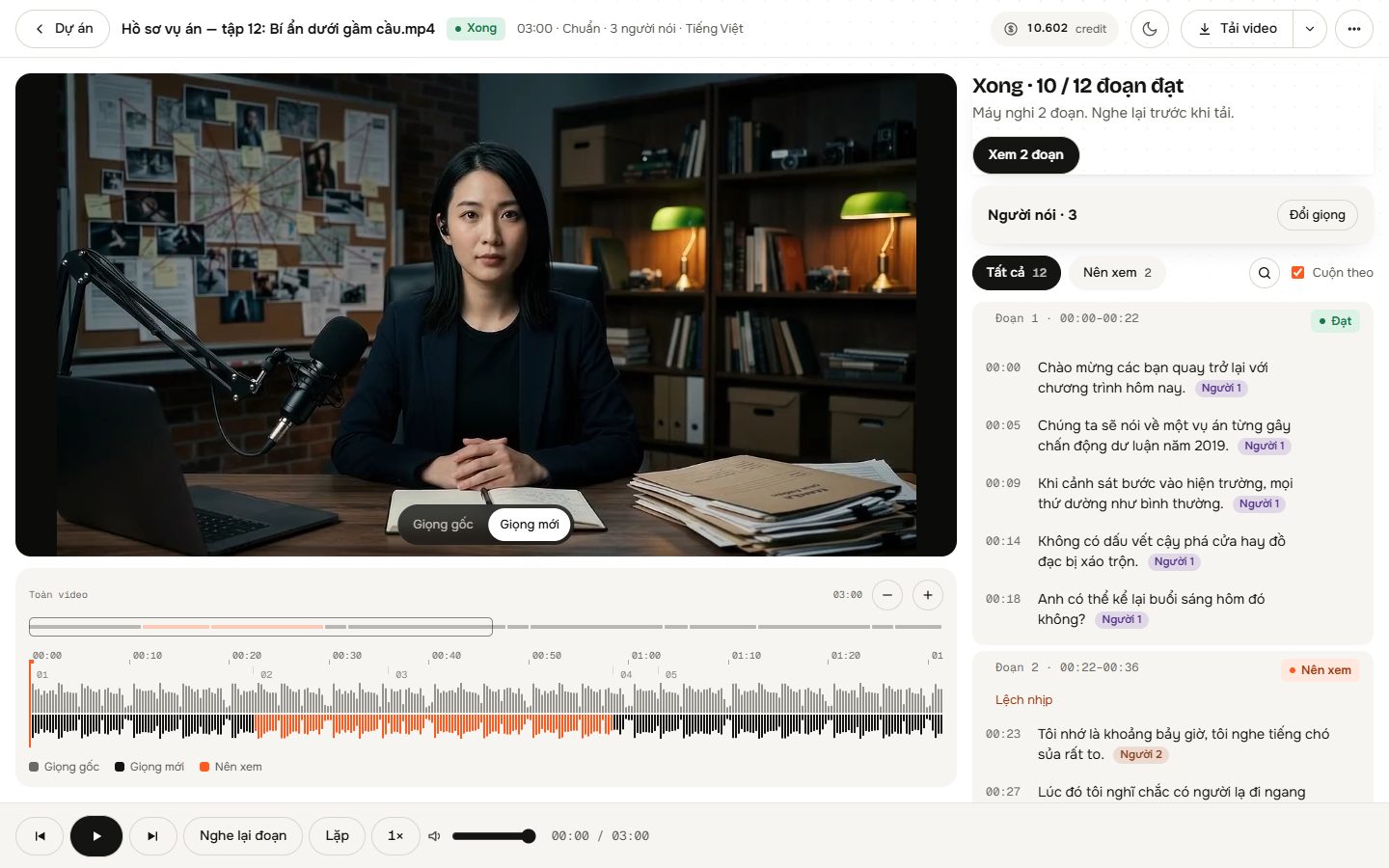
Purpose-Built for AI Dialogue Workflows
Preserves existing lip timing
The replacement voice matches the sentence-by-sentence timing of original speech, keeping Runway lip movements aligned.
Background audio preservation
AI isolates the spoken vocal track so background music, Foley, and ambient room noise remain intact in the final mix.
Multi-speaker detection
AI analyzes audio and video frames to detect speakers, assigning distinct voices in Auto mode or across up to 4 custom picks.
Expressive audio handling
Laughter and sighs are re-performed in the new character voice, while singing segments are detected and left original.
Studio segment controls
Review individual lines, toggle between original and converted takes, check AI-flagged words, and export WAV or SRT.
Where Creators Use Runway Re-Voicing
Cinematic scene continuity
Maintain the exact same vocal identity across multiple Runway Gen-4.5 generations without unpredictable tone shifts.
Character voice refinement
Swap out generic or mismatched native AI voices with bespoke character voices tailored by gender, age, and pitch.
Dialogue polish for finished edits
Fix vocal delivery flaws in an approved Runway visual take without re-rendering the scene or rebuilding audio tracks.
Simple Pay-As-You-Go Credits
No subscription required. Pay only for the audio you process at $0.06 per minute on the Standard tier. New accounts receive 1,500 free credits to get started.
- 300 credits per minute of video at Standard tier
- Credits deduct on generation and refund automatically if a system error occurs
- Fast and Pro processing tiers available to match your workflow needs
Frequently asked questions
Does it translate to another language?
No, it does not translate. The tool re-voices the video in the exact same language using a different voice. It does not perform cross-language translation.
Does the video need speech already?
Yes. The video must already have spoken words—from Runway Gen-4.5 native dialogue, a guide track, or a lip-sync tool. It cannot generate speech for silent video.
Will re-voicing desynchronize my Runway lip sync?
No. The new voice follows the sentence-by-sentence timing of the original speech, ensuring existing mouth movements match without changing the video frames.
What happens to sound effects and background music?
AI separates the vocal track from background audio, allowing the new voice to be mixed directly back over the original music, ambiance, and sound effects.
Can I give different Runway characters distinct voices?
Yes. In Multiple Speakers mode, you can assign up to 4 distinct voices. You can also manually review detected speakers and assign individual voices before processing.
Can I use my own voice clone?
Yes. You can add your own voice by uploading or recording a clean 4–30 second audio sample, provided you have the speaker's explicit consent.
Re-Voice Your Runway Gen-4.5 Videos Today
Change character voices while keeping mouth sync, visuals, and background audio intact.
Start with 1,500 Credits