Hailuo MiniMax Voice Replace Without Video Rerolls
Hailuo 3.0 talks, but rerolling to fix a voice changes your visuals. Re-voice your clip in the same language while preserving audio timing and background sound.
- Same language, never translated
- Picture untouched
- Music and sound effects kept
The Hidden Costs of Adjusting Hailuo 3.0 Speech
- 1
Rerolling video burns generation credits
In MiniMax Hailuo 3.0, altering audio via regeneration alters the entire video generation. You lose the exact visual frame, acting, and lighting you originally liked.
- 2
Monthly speech tool subscriptions add up
Paying for a separate monthly audio suite just to tweak dialogue adds recurring overhead. Budget creators end up paying subscriptions they rarely exhaust.
- 3
Manual timeline realignment wastes time
Exporting audio, running external changers, and manually cutting speech back onto video requires aligning lips sentence by sentence while protecting background audio.
Cost Stack: External Audio Pipeline vs. DubSI Voice Swap
| Hailuo + External Audio Pipeline | Hailuo + DubSI Voice Swap | |
|---|---|---|
| Workflow | Export clip, strip audio, re-record or process, manually realign mouth sync | Upload Hailuo clip, select replacement voice, download synced video |
| Pricing commitment | Separate monthly subscription plans regardless of video volume | Pay-as-you-go credits per second: $0.06 per minute at Standard tier |
| Visual consistency | Rerolling MiniMax H3 for a better voice rerolls the entire scene | Picture is never touched; original visual frames stay identical |
| Background sound | Requires manual audio splitting to avoid losing background effects | Separates speech automatically and re-mixes new voice over original audio |
At the time of writing, MiniMax Hailuo 3.0 includes native audio. DubSI Voice Swap operates on finished MP4, MOV, WEBM, or MKV video files without subscription requirements.
How to Replace Voices in Hailuo 3.0 Videos
- 1
Upload your Hailuo video
Drop your exported Hailuo 3.0 file (MP4, MOV, WEBM, MKV) up to 2 minutes on the free trial. The video must contain spoken dialogue.
- 2
Choose your replacement voices
Select from the voice library, design a voice by attributes, or assign individual voices across up to 4 detected speakers in multiple speakers mode.
- 3
Review segments and download
Compare before and after audio per segment in the Studio. Keep original sections whenever needed, then export your video, audio WAV, or SRT subtitles.
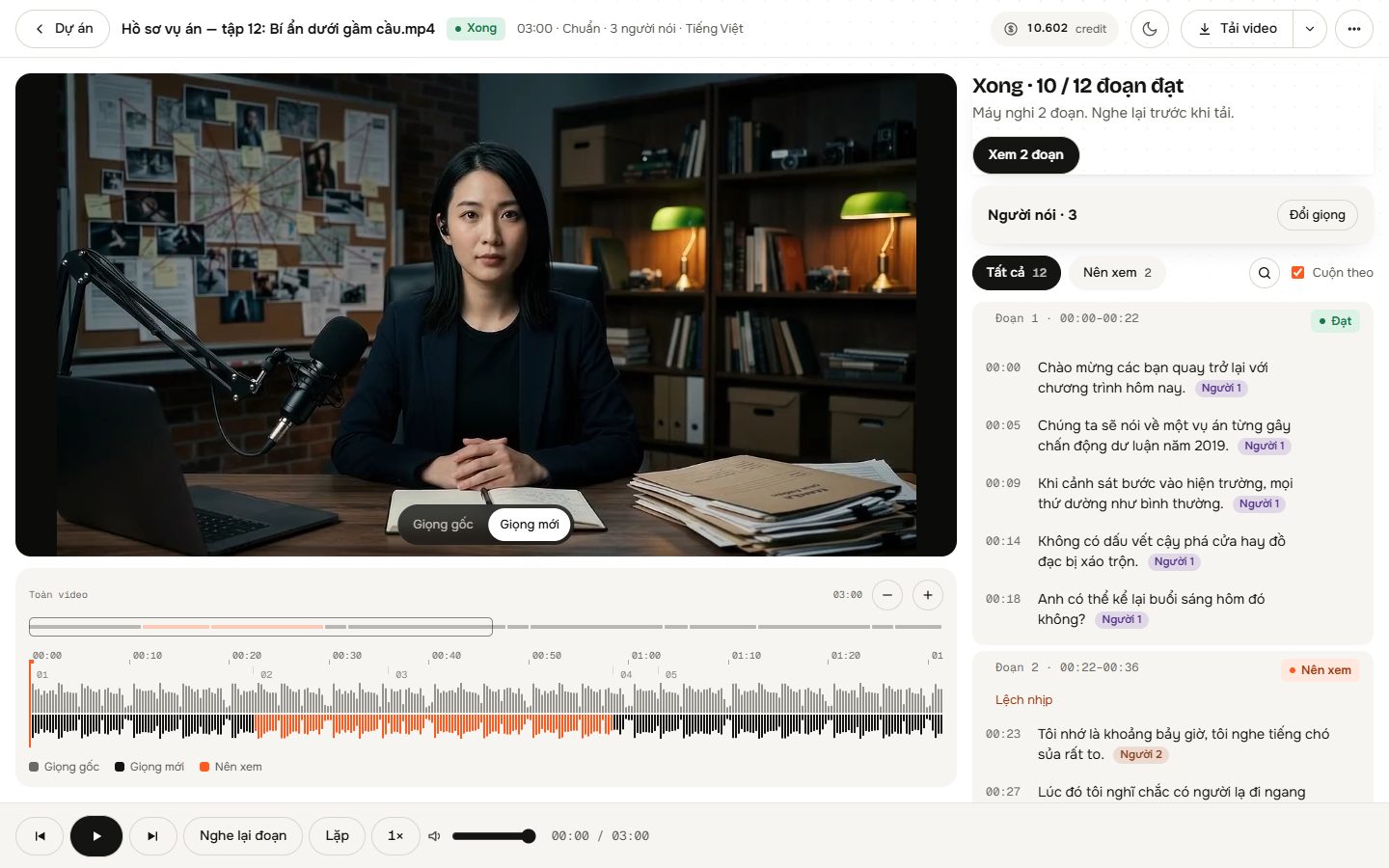
Built for Fast AI Character Audio Adjustments
Precise timing alignment
The new voice strictly follows original sentence timing, keeping your Hailuo character's mouth movements matched without altering the picture.
Automatic background separation
AI separates spoken dialogue from background music and environmental sound effects, blending the replacement voice seamlessly over the original sound.
Multi-speaker identification
AI evaluates audio and visual frames to identify distinct speakers. Use Auto mode or manually map different voices to up to 4 characters.
Laughs and sighs preserved
Natural human inflections like laughter and sighs are re-performed in the replacement voice rather than deleted or left mismatched.
Singing detection
If your video contains sung sections, DubSI Voice Swap detects singing and retains the original performance automatically.
Built-in quality review studio
An integrated quality check inspects processed lines and flags questionable words, letting you toggle original speech per segment before final export.
Where to Use Hailuo MiniMax Voice Replace
Cinematic Hailuo storytelling
Maintain specific character voice profiles across multiple Hailuo 3.0 clips without regenerating perfect visual shots.
Cost-effective indie production
Avoid expensive monthly audio software tiers by paying only for exact video seconds processed at $0.06 per minute.
Dialogue multi-speaker scenes
Assign unique voices to different characters within a single Hailuo clip using automated speaker assignment and multi-speaker mode.
Pay As You Go Per Second
No subscription required. Spend credits only when you swap voice at $0.06 per minute on the Standard tier. Test your Hailuo clips with 1,500 free credits upon sign-up.
- 300 credits per minute of video at Standard tier ($0.06 per minute)
- No monthly subscription lock-in; recharge credits only when needed
- Automatic credit refund if a system error prevents processing completion
- New accounts receive 1,500 free credits immediately
Frequently asked questions
Does it translate to another language?
No. DubSI Voice Swap re-voices speech in the same language. It does not perform cross-language translation or multilingual dubbing; words and language remain identical to the original video.
Does the video need speech already?
Yes. DubSI Voice Swap modifies existing spoken dialogue. It cannot generate speech from silent video. Your clip must already contain audible speech from Hailuo 3.0, a guide track, or a lip-sync tool.
Is DubSI Voice Swap affiliated with MiniMax or Hailuo?
No. DubSI Voice Swap is an independent audio tool and has no affiliation with MiniMax or Hailuo. Hailuo 3.0 is referenced purely as the source video format at the time of writing.
What happens to the background music and ambient effects in my clip?
AI isolates the dialogue from background elements. The new voice is placed back over the original ambient sound effects and background music without deleting them.
Can I use my own voice sample?
Yes. You can add a voice from a 4–30 second recording or uploaded sample. You must have the explicit consent of the speaker.
What happens if a line does not sound right in Studio?
Our automated quality check flags imperfect words. You can review every sentence, toggle between original and replacement audio, or regenerate only that speaker's lines.
Replace Voices in Your Hailuo Clips Today
Keep your Hailuo 3.0 visuals and background audio while assigning the exact voice you need. Start editing with your 1,500 free credits.
Start Free Trial