Seedance Audio Swap for Multi-Scene Continuity
Lock one distinct voice per character across every Seedance 2.5 generation. Re-voice dialogue in the same language without changing your picture or ambient audio.
- Same language, never translated
- Picture untouched
- Music and sound effects kept
The Seedance 2.5 Character Voice Dilemma
- 1
Voice Drift Across Generations
Seedance 2.5 creates dialogue up to 30 seconds per pass, but stitching multiple scenes together often gives the same visual character completely different vocal tones.
- 2
Regenerating Alters the Visuals
If you re-prompt Seedance to fix an awkward voice performance, you waste credits and regenerate the entire video frame, losing your ideal visual take.
- 3
Lost Ambient Audio in Traditional Overhauls
Stripping video audio manually to fix dialogue removes room tone, sound effects, and background music generated alongside your Seedance sequence.
Seedance 2.5 Cast Consistency: Before vs After
| Raw Seedance Generations | DubSI Voice Swap Character Cast Lock | |
|---|---|---|
| Character Continuity | Vocal tone shifts with every newly generated clip | Same chosen voice locked across every scene in your project |
| Visual Stability | Requires complete visual regeneration to adjust tone | Video frames remain untouched; only the voice changes |
| Lip Sync Alignment | Third-party audio overlays drift out of sync | Sentence-by-sentence timing follows original lip movement |
| Scene Soundscape | Deleting audio wipes all native effects and music | AI separates dialogue, re-voices, and remixes background audio |
Based on public reports at the time of writing. DubSI Voice Swap changes voice within the same language and does not regenerate visuals or translate languages.
How to Swap Voices on Seedance 2.5 Videos
- 1
Upload Your Seedance Video
Drop in your Seedance MP4, MOV, WEBM, or MKV file (up to 2 minutes per video on the free trial). The video must already contain spoken dialogue.
- 2
Assign Voices per Character
Let AI auto-assign voices or manually select distinct voices from the library, custom uploaded voice samples, or attribute-designed profiles for up to 4 speakers.
- 3
Review Segments and Export
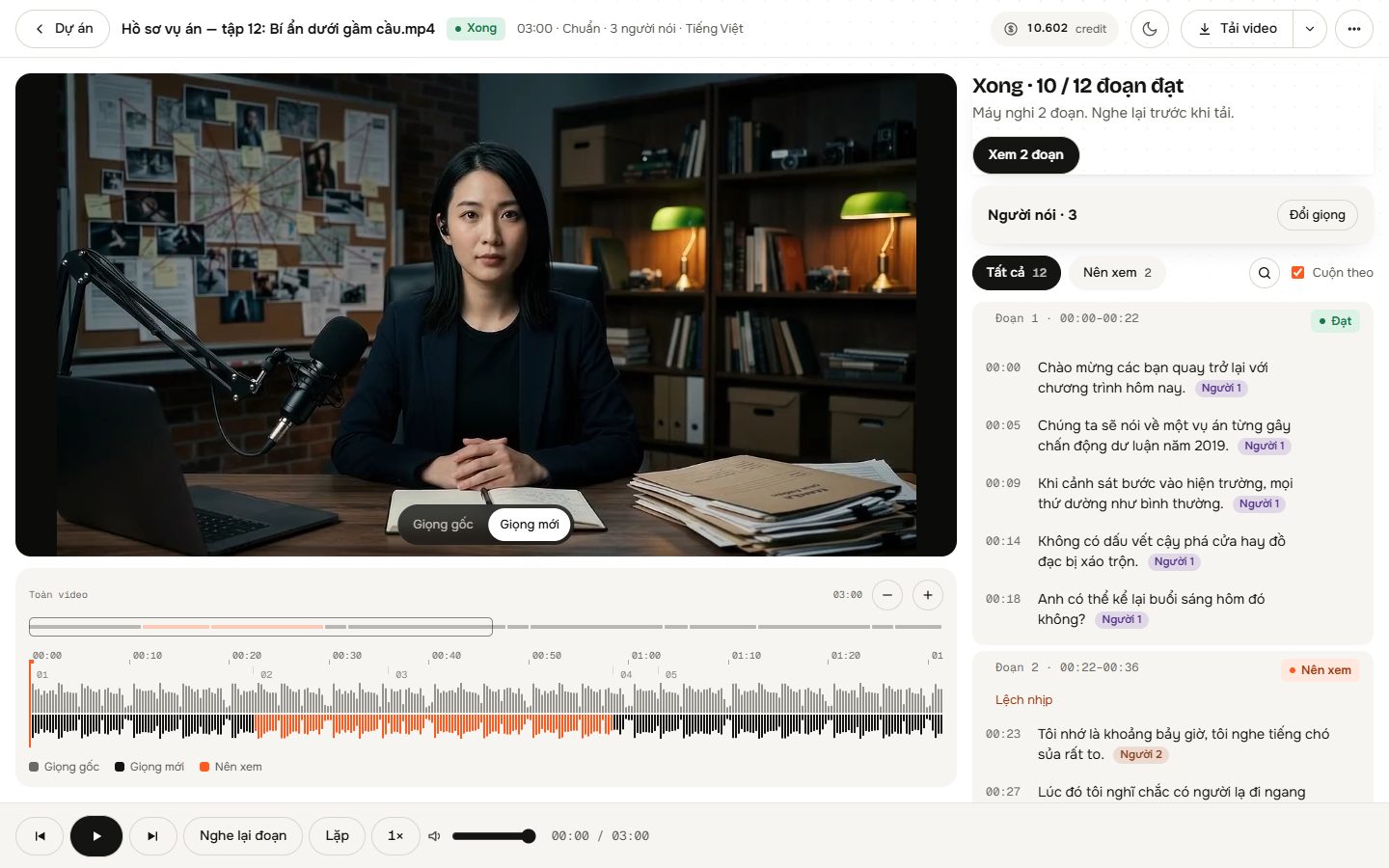
Compare original and new audio line-by-line in the Studio. Switch back any segment you prefer, run the AI quality check, and export video, WAV, or SRT.
Precision Audio Swapping for AI Video
Preserved Background Sound
The engine separates speech from background audio, swapping only dialogue before remixing your scene's original ambient noise, music, and foley effects.
Sentence-Level Lip Sync Match
The replacement voice preserves the exact rhythm and sentence timing of the original speech, maintaining existing mouth movement sync without modifying video frames.
Multi-Speaker Detection
AI analyzes audio and video frames to detect speakers. Assign voices automatically by gender and speaking time, or manually allocate up to 4 custom voices.
Expressive Nuance & Singing Detection
Laughter and sighs are re-performed in the selected voice rather than stripped. Singing segments are automatically identified and preserved in the original audio.
Granular Studio Editing
Inspect each segment in the Studio, swap voices for a single speaker without re-rendering others, or revert individual lines to their original audio instantly.
Where to Use Seedance Audio Swaps
Multi-Scene AI Storytelling
Maintain vocal continuity for recurring characters across separate Seedance 2.5 clips assembled into short films, episodes, or narrative reels.
Multi-Tool Video Pipelines
Unify character voices across scenes generated from different AI video models, keeping your cast sounding consistent throughout the final edit.
Directing Character Persona
Replace default AI generation voices with curated voices from your own library, uploaded samples with speaker consent, or designed vocal attributes.
Transparent Pay-As-You-Go Credits
Swap voices without long-term commitments. Standard tier processing is $0.06 per minute, billed by the second. Try it out immediately with 1,500 free credits upon sign up.
- No monthly subscription required; pay only for the video seconds processed
- Includes 1,500 free credits to test your Seedance clips
- Automatic credit refund if processing fails due to a system error
- Fast tier costs less, Pro tier costs more
Frequently asked questions
Does this tool translate Seedance dialogue into another language?
No. DubSI Voice Swap does not perform cross-language translation. It changes the voice of the speaker within the same language, keeping the spoken words intact while applying a new vocal tone.
Does my Seedance video need to have speech already?
Yes. The tool does not generate dialogue from scratch for silent footage. Your Seedance video must already have spoken dialogue, as the new voice matches the timing of the existing speech.
How does DubSI Voice Swap keep the new voice in sync with the mouth movements?
The new voice precisely follows the pacing and sentence-level timing of the original audio. Because the delivery timing remains identical, the video's original lip movements match without any image manipulation.
What happens to background music and sound effects in my Seedance video?
The AI separates vocal tracks from non-vocal audio. Only the spoken voice is changed, and the newly synthesized performance is mixed back over your original background audio and effects.
Can I replace voices for multiple characters in one Seedance clip?
Yes. Using multiple speakers mode, you can assign up to 4 different voices. You can let the system assign them based on gender and screen time, or manually assign characters in the Studio.
Can I use my own voice for a Seedance character?
Yes. You can add a custom voice by uploading or recording a 4 to 30-second audio sample, provided you have the speaker's consent, or choose from the built-in library and voice designer.
Lock Consistent Voices Across Your Seedance Scenes
Re-voice your Seedance 2.5 scenes with preserved lip sync, background audio, and full cast consistency.
Start Voice Swap Free